Pocket Option withdrawal problems usually fall into one of two buckets: normal verification friction that I can fix in an afternoon, or platform-side stalling that needs a different playbook entirely. After working through dozens of payout flows on this broker and reading aggregated complaint patterns across Trustpilot, WikiFX, and the broader trading community, I’ve built a step-by-step framework that separates procedural snags from genuine disputes. Here’s how I troubleshoot a stuck Pocket Option withdrawal, in the exact order I’d do it myself.
Before Troubleshooting
What I'll Need Before Troubleshooting a Pocket Option Withdrawal
Before opening a support ticket or panicking about a delayed payout, I gather everything I need to actually diagnose the issue. Skipping this step is why most users end up in circular conversations with support.
Here’s my starter kit:
- A fully verified account, including ID, proof of address, and card verification if I deposited by card.
- The exact payment method and account details I used to deposit funds.
- Screenshots of every pending withdrawal request, including the request ID and timestamp.
- Access to the support ticket system inside the Pocket Option dashboard.
- A copy of any bonus terms I accepted, including turnover requirements.
- Two-factor authentication enabled, preferably Google Authenticator.
With this in hand, I can answer the questions support will ask without scrambling.
Why Withdrawals Get Stuck
Why Pocket Option Withdrawals Get Stuck: The Real Reasons
Most “Pocket Option withdrawal problems” are not the platform refusing to pay. They are process issues triggered by Pocket Option’s payment policy, incomplete KYC, or bonus terms the user accepted without reading. That’s the honest framing.
That said, aggregated complaint patterns on Trustpilot, WikiFX, and Forex Peace Army show a meaningful minority of users describing blocked accounts, repeated KYC loops, and frozen profits after winning streaks. These are individual experiences, not verified facts, and review platforms attract both genuinely wronged users and incentivized posts on both sides. I treat any single five-star or one-star review with skepticism. The pattern across hundreds of reports is what matters.
The Same-Source Payment Rule That Catches Most Traders
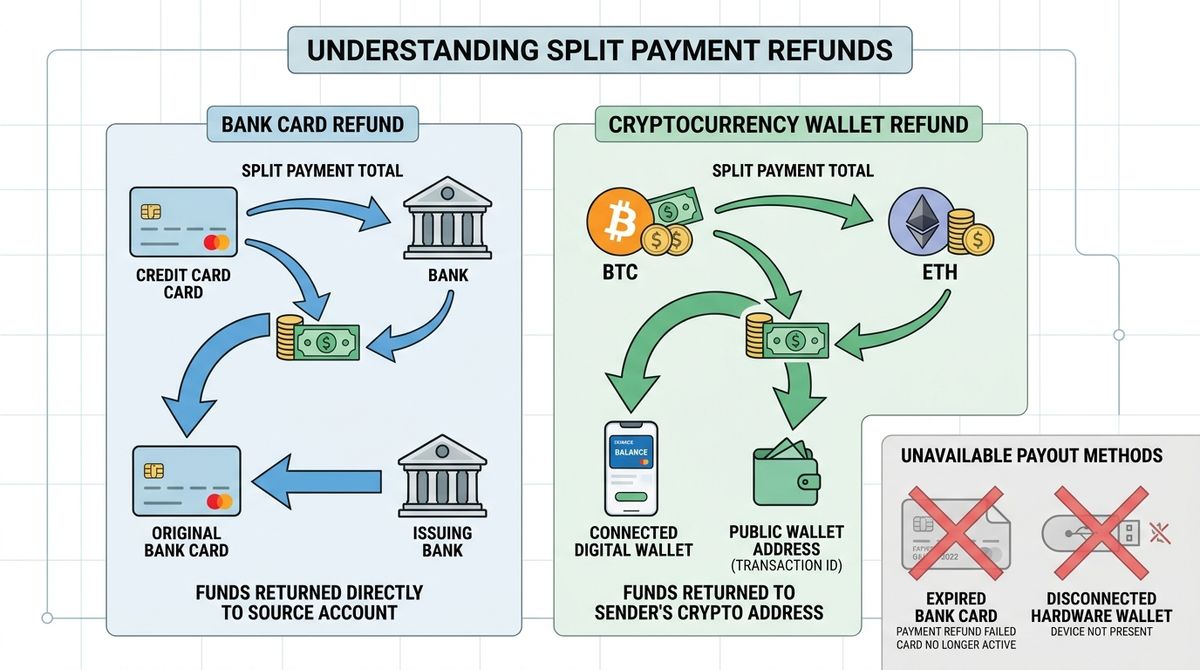
Pocket Option’s payment policy is explicit: withdrawals to the same[1] payment system and same purse ID used for the original deposit. If I funded with USDT TRC20, I withdraw to a USDT TRC20 wallet. If I deposited with a Visa card, the payout returns to that same Visa card. Trying to deposit by crypto and cash out to a bank account is the single most common cause of rejection I see.
Verification Status: The Silent Blocker
KYC issues hold funds in limbo even when the dashboard says “processing.” The interface doesn’t always make it obvious that verification is the bottleneck. A withdrawal can sit untouched for days while the back office waits on a document I don’t realize is pending.
Bonus Terms and Turnover Requirements
Accepting a deposit bonus ties up withdrawals behind volume requirements most users skim past. The platform shows “free balance” as the actually withdrawable amount, while the bonus-locked portion stays out of reach until turnover is met.
Prepare Your Withdrawal
Before Requesting a Withdrawal: Verification, Payment Details, and Bonuses
Step 1: Confirm Account Verification Is Fully Complete
I open the Profile section and check for a green “Verified” status. “Pending review” or “Additional documents required” means the withdrawal will stall until documents clear. The full document checklist, image quality standards, and rejection-handling steps are in the complete Pocket Option verification guide — work through that first if KYC is the bottleneck.
Step 2: Match the Withdrawal Method to the Deposit Method
I open my deposit history in the Finance section and list every method I’ve used to fund the account. Pocket Option’s policy requires the withdrawal to flow back through those same channels, capped at the amount deposited via each.
How to Handle Mixed Deposit Sources
If I deposited $500 by card and $300 in USDT, the Public Offer[2] says withdrawals to those methods follow the same 5:3 proportion. For profits above my deposits, the payment policy[1] says the method is agreed by the company and client; I do not assume the dominant method wins.
When the Original Method Is No Longer Available
Expired cards and lost wallets are real problems. I open a support ticket explaining the situation, attach proof that the original method is no longer accessible (a bank statement showing the card is closed, for example), and request an alternate payout. Approval is not guaranteed but it’s the only official path.
Step 3: Verify the Withdrawal Amount Meets the Minimum
The minimum withdrawal is $10 for most methods. Pocket Option’s published method guide[3] lists $100 for Bitcoin, although the live dashboard may show a different current minimum. Always confirm the live minimum in the dashboard before submitting.
A Trustpilot complaint from June 2026 described an auto-canceled $10.75 withdrawal while selfie verification was pending; it does not establish that the minimum changed in real time. Submitting a withdrawal that sits just above what I assume is the minimum is a risk I avoid. I push the amount well clear of any borderline.
Crypto Minimums vs. Card Minimums
| Method | Typical Minimum | Notes |
|---|---|---|
| USDT TRC20 | $50 in Pocket Option’s published guide | Check the live dashboard |
| USDT ERC20 | $20 in Pocket Option’s published guide | Network fees can still apply |
| Bitcoin | Up to $100 (network fees variable) | Network fee absorbed by minimum |
| Visa/Mastercard | From $10 in Pocket Option’s published guide | Verify the current card minimum |
| Perfect Money (older reports) | Not currently confirmed | Older sources reported a 0.5% transaction fee; check the live account menu |
| Bank wire | From $10 in Pocket Option’s published guide | Provider terms and processing vary |
These ranges shift by region and account status, so I check the live minimum shown in my dashboard before submitting.
Step 4: Double-Check Every Payment Detail Before Submitting
Small typos cost real money. Wallet addresses must be copied and pasted, never typed. Network selection for crypto must match the deposit network exactly. IBANs and card numbers get verified character by character.
The TRC20 vs. ERC20 Trap
Sending USDT on the wrong network is the most expensive mistake I see. TRC20 and ERC20 are not interchangeable. Funds sent to the wrong chain may be unrecoverable. Inside the Pocket Option withdrawal interface, the network is displayed alongside the wallet address field. I confirm it matches my receiving wallet’s network before clicking submit.
Step 5: Review Any Active Bonuses Before Requesting Withdrawal
I open the account dashboard and look for active bonus status. If a bonus is attached, the dashboard shows the remaining turnover required to unlock the funds. Pocket Option’s own guidance makes clear that bonuses are deducted when withdrawal is requested before the turnover is “worked off.”
How to Cancel a Bonus to Free Up a Withdrawal
The cancellation option sits inside the bonus details panel. Canceling forfeits the bonus amount itself, and depending on the bonus type, may also forfeit profits earned with bonus funds. I read the cancellation warning carefully before confirming. If I primarily care about withdrawing my original deposit and earned profits, canceling is often the cleaner path. Before claiming any future promotion, I review how Pocket Option’s promotional offers work so I don’t repeat the same trap.
Submit, Track & Escalate
Submitting, Tracking, and Escalating a Withdrawal
Step 6: Submit the Withdrawal Correctly
The submission flow:
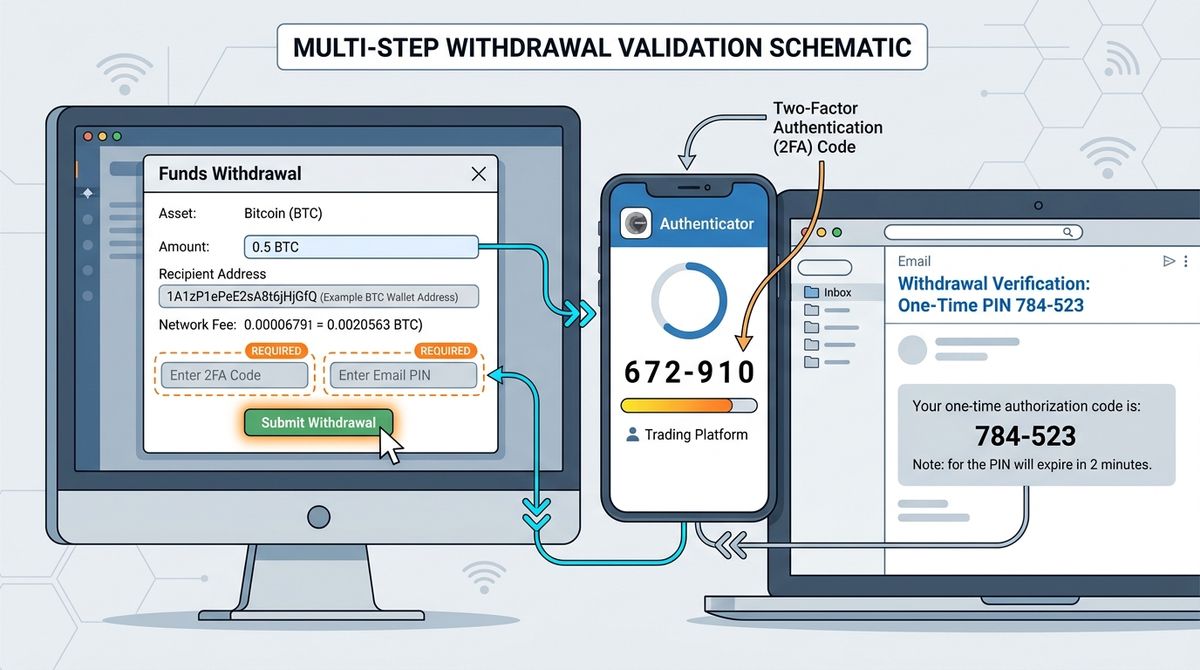
- Open Finance, then click Withdrawal.
- Select the method matching my original deposit.
- Enter the amount, staying clear of the minimum threshold.
- Input wallet address or payment details, confirming network and currency.
- Enter the 2FA code from Google Authenticator.
- Enter the PIN code emailed to me, which expires quickly.
- Confirm and submit.
Confirming the Request Was Accepted
A successful submission produces a request ID, a “Pending” status in my withdrawal history, and a confirmation email within minutes. If any of those three signals is missing, I assume the request didn’t go through and check the Finance section before resubmitting.
Step 7: Track Processing Times Realistically
Pocket Option’s documented window is up to five business days. Independent reviews cite typical processing of 1 to 5 business days. Crypto and e-wallet withdrawals often clear within a few hours for established, verified accounts, while bank transfers can stretch to 3 to 5 business days or longer.
In practical terms: small crypto withdrawals often arrive within an hour to a few hours. Larger amounts, first withdrawals on new accounts, and bank wires take longer. A $1,000 USDT withdrawal completing in 23 minutes is realistic for an established, verified account. An 11-hour wait on a first withdrawal from a new account is also realistic.
When “Pending” Becomes a Problem
I don’t escalate before the five business day mark unless I see a clear error in the request. Past five business days with no status change, I start a support conversation. Past ten business days with no movement and vague responses, I treat the situation as a dispute, not a delay.
Step 8: Contact Support the Right Way
Live chat inside the dashboard is the fastest channel. Email tickets through Help and Customer Support are slower but create a written record. I use both.
Ticket Wording That Gets Faster Responses
The format I use in the first message:
- Request ID and date submitted.
- Withdrawal method and amount.
- Account email and verified status.
- Specific question, not a vague complaint.
A clear ticket gets a clear response. A rambling complaint gets a templated reply.
Escalation Paths When Support Stalls
If a ticket sits idle for 48 hours, I follow up once. After a second 48-hour silence, I request a supervisor or senior agent by name in the ticket. If that fails, public complaint channels (Trustpilot, WikiFX, Forex Peace Army) sometimes prompt a faster response, but I treat them as last resort, not first move. Both WikiFX and Trustpilot show active 2026 complaint volume, so I’m not the only one walking this path. For accounts that have been locked rather than just delayed, I follow the recovery process for blocked Pocket Option accounts instead, because the playbook is different.
Step 9: Handle Canceled or Auto-Rejected Withdrawals
Auto-cancellation triggers I see most often: IP address changed between deposit and withdrawal, document on file expired, withdrawal method conflicts with deposit source, amount below the minimum, name mismatch between Pocket Option account and external payment account.
IP Address and Location Flags
Logging in from a VPN, traveling abroad, or switching networks during a withdrawal can trigger a security freeze. I disable VPNs before submitting a withdrawal and use the same network I use for daily trading. If a freeze hits, I contact support, explain the location change, and provide ID confirming my country of residence.
Step 10: Document Everything for Disputes
I keep screenshots of every withdrawal request showing the request ID, amount, method, and timestamp. I save all support chat transcripts and email threads. I keep transaction IDs for both deposits and any partial withdrawals received.
This matters because if I need to file a chargeback through my card issuer or escalate publicly, I’ll need evidence. In a WikiFX user report from 2026, a trader said about $14,000 of roughly $40,000 in deposits was returned through chargebacks. I cannot verify the transaction independently; the report illustrates why keeping records matters.
Errors & Platform Issues
Troubleshooting Errors and Platform Issues
Troubleshooting Common Pocket Option Withdrawal Error Messages
“Withdrawal Not Available for This Method”
The same-source rule triggered this. I check my deposit history and request through a matching method.
“Verification Required”
KYC isn’t complete. I open Profile, complete every flagged document, and wait for “Verified” status before resubmitting.
“Insufficient Balance”
The displayed balance includes bonus-locked funds. Free balance is what’s actually withdrawable. I either complete the turnover requirement or cancel the bonus.
“Request Canceled by System”
Common triggers: amount below minimum, IP flag, expired document, method mismatch. I check each one and resubmit cleanly.
When the Problem Isn’t Mine to Fix: Recognizing Platform-Side Issues
Some Pocket Option withdrawal problems are not procedural — the block operates at the account level, triggered by clause enforcement after profitable periods, KYC disputes, or suspected terms violations. If the account itself is restricted or suspended rather than just a single withdrawal being delayed, the playbook is completely different. The full guide to recovering a blocked Pocket Option account covers the diagnostic steps, escalation paths, and documentation needed to build a recovery case.
Withdrawal Checklist
My Pre-Withdrawal Checklist to Avoid Problems Entirely
- Complete verification on day one, before depositing real funds.
- Deposit and plan to withdraw through the same method.
- Skip promotional bonuses if I expect to withdraw soon.
- Confirm every payment detail twice, especially crypto network selection.
- Request amounts well above the stated minimum.
- Trade and withdraw from the same IP and country.
- Keep documents current; refresh proof of address every 90 days.
- Save screenshots and transaction IDs as a habit, not after a problem.
Following this list eliminates the majority of withdrawal friction I’ve seen in real-world use. For the broader verdict on the platform, read my full verdict on Pocket Option.
FAQs
Frequently Asked Questions About Pocket Option Withdrawal Problems
What is the minimum withdrawal amount on Pocket Option?
The minimum withdrawal starts at $10 for many methods. Pocket Option’s published guide lists $100 for Bitcoin and $50 for USDT TRC20; the live dashboard is the figure to trust. The live minimum shown in your dashboard is the figure to trust over any third-party listing.
How long do Pocket Option withdrawals normally take?
Pocket Option’s own policy states withdrawal requests are normally processed within five business days. In practice, crypto and e-wallet withdrawals often arrive within hours, while bank transfers can take 3 to 5 business days, though delays beyond that window have been reported in some cases. First withdrawals on new accounts tend to take longer than withdrawals on established, verified accounts.
Why was my Pocket Option withdrawal canceled?
The most common reasons are amount below the minimum threshold, mismatch between deposit and withdrawal methods, incomplete verification, expired documents, IP address change between deposit and withdrawal, or name mismatch between the Pocket Option account and the external payment account. The cancellation email usually states the reason.
Can I withdraw after using a Pocket Option bonus?
Yes. I can withdraw the original deposit without completing bonus turnover, but the active bonus and bonus-linked profit may be removed; to keep those bonus-linked funds, I must meet the specific offer’s turnover requirement. I can cancel the bonus to free up the underlying deposit, but I’ll forfeit the bonus amount and possibly any profits earned with bonus funds.
What should I do when Pocket Option support doesn’t respond?
I follow up once after 48 hours, then request a supervisor after another 48 hours of silence. If that fails, I post on Trustpilot, WikiFX, or Forex Peace Army with my request ID and timeline. Public visibility sometimes prompts faster handling. For card deposits, I also explore chargebacks through my issuer, which has worked for some users in disputed cases.
Does Pocket Option actually pay out?
The honest answer is: usually yes, but not always. Verified accounts withdrawing through matching deposit methods, without active bonuses, and below dispute thresholds typically receive funds within the stated window. A meaningful minority of users report blocked accounts and frozen funds, especially after profitable periods or when withdrawing large amounts. Treating the platform as unregulated and managing position size accordingly is the realistic posture.